Jump to content
View in the app

A better way to browse. Learn more.

GTAGames.nl - De Nederlandse Grand Theft Auto Community!

A full-screen app on your home screen with push notifications, badges and more.

To install this app on iOS and iPadOS
  1. Tap the Share icon in Safari
  2. Scroll the menu and tap Add to Home Screen.
  3. Tap Add in the top-right corner.
To install this app on Android
  1. Tap the 3-dot menu (⋮) in the top-right corner of the browser.
  2. Tap Add to Home screen or Install app.
  3. Confirm by tapping Install.

Editie 65 - De Snuffelaar

(0 reviews)

Hoeveel procent heb je GTA Vice City uitgespeelt? 91 members have voted

  1. 1. Hoeveel procent heb je GTA Vice City uitgespeelt?

    • 10%
      5
    • 20%
      6
    • 30%
      1
    • 40%
      2
    • 50%
      11
    • 60%
      6
    • 70%
      4
    • 80%
      7
    • 90%
      40
    • 100%
      0

This poll is closed to new votes

Please sign in or register to vote in this poll.

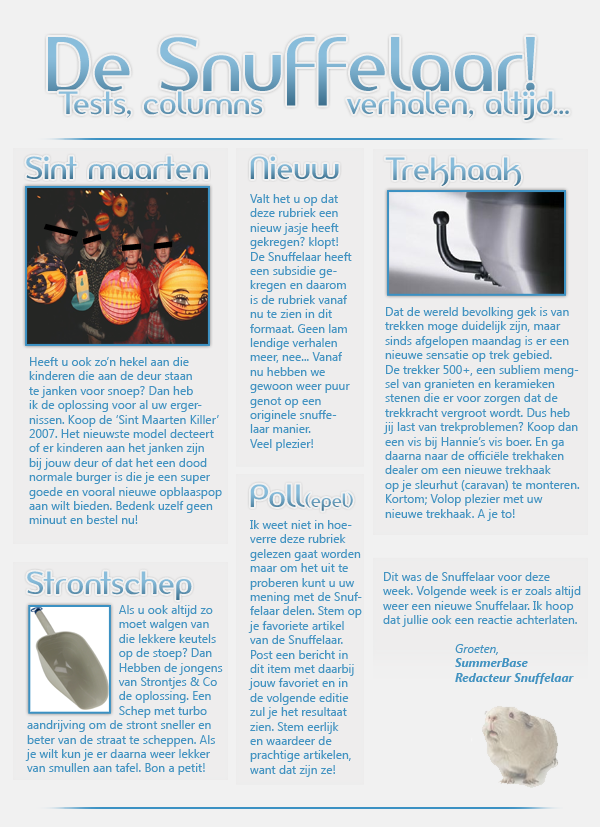
gallery_33831_25_165026.png

7 Comments

Recommended Comments

Mirrrr Most Wanted (★★★★★)

Mirrrr

Leden

okay die trekhaak ziet er best eng uit Summer :Y

-Matthijs- Forum Legend

-Matthijs-

Ereleden

Die 'Sint Maarten Killer' neem ik mee, dank u. :D

Youp Postless Person

Youp

Banned

Whaha, briljant!

Ik ga voor de strontschep! :D

Donwell Al Capone

Donwell

Leden

Mooi nieuw jasje, en meteen leuke producten. :7

Lantyz Legendary Godfather

Lantyz

Ereleden

Nadeel van het nieuwe jasje is dat het net iets te breed is, waardoor de afbeelding naar 96% wordt herschaald. Wellicht een idee de volgende Snuffelaar iets smaller te maken?

SummerBase Al Capone

SummerBase

Leden

Klopt, ik knip hem de volgende keer wel in twee

Pietje II Al Capone

Pietje II

Leden

Whahaha, briljant! Strontschep met turbo-aandrijving :7 Ik zie iedereen al standaard met die strontschep op straat lopen om die slingerende hondendrollen op te scheppen :schater: En die trekhaak is ook zeer gewaagd :')

Ziet er echt heel leuk uit zo, Freek. Ga zo door, zou ik zeggen! :tu:

Guest
Add a comment...

Account

Navigation

Search

Configure browser push notifications

Chrome (Android)
  1. Tap the lock icon next to the address bar.
  2. Tap Permissions → Notifications.
  3. Adjust your preference.
Chrome (Desktop)
  1. Click the padlock icon in the address bar.
  2. Select Site settings.
  3. Find Notifications and adjust your preference.