



Jump to content
View in the app

A better way to browse. Learn more.

GTAGames.nl - De Nederlandse Grand Theft Auto Community!

A full-screen app on your home screen with push notifications, badges and more.

To install this app on iOS and iPadOS
  1. Tap the Share icon in Safari
  2. Scroll the menu and tap Add to Home Screen.
  3. Tap Add in the top-right corner.
To install this app on Android
  1. Tap the 3-dot menu (⋮) in the top-right corner of the browser.
  2. Tap Add to Home screen or Install app.
  3. Confirm by tapping Install.

Editie 152 - Interactie

(0 reviews)

Hoeveel procent heb je GTA Vice City uitgespeelt? 91 members have voted

  1. 1. Hoeveel procent heb je GTA Vice City uitgespeelt?

    • 10%
      5
    • 20%
      6
    • 30%
      1
    • 40%
      2
    • 50%
      11
    • 60%
      6
    • 70%
      4
    • 80%
      7
    • 90%
      40
    • 100%
      0

This poll is closed to new votes

Please sign in or register to vote in this poll.

gallery_108553_47_4109.gif

Deze rubriek is geschreven door Thundercover!

[hr=2]#3b91c3[/hr]

Hersenkraker
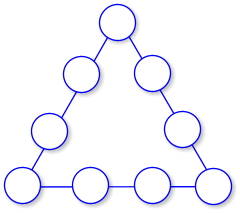
gallery_13783_45_4182.png

Hierboven zie je een magisch driehoek (oei, spannend 8)). Vul de getallen 1 t/m 9 zo in dat elke zijde een waarde van 20 heeft als elk cijfer maar één keer gebruikt wordt. Probeer het ook voor de waarde 17.

Puzzel: Hersenkraker

Prijs: 2000

Winnaar: ???

[hr=2]#3b91c3[/hr]

Los de puzzel op voor 2000 TOC Casino Credits!

5 Comments

Recommended Comments

MegaPilot Community Legend

MegaPilot

Leden

Ik snap het eerlijk gezegd niet? :$ Magisch vierkant ken ik, maar driehoek is me totaal onbekend. :puh:

Kai-ShockWave The Godfather

Kai-ShockWave

Leden

4k7gpf.jpg
Kai-ShockWave The Godfather

Kai-ShockWave

Leden

qo9cg4.jpg
Bierbuikje The Godfather

Bierbuikje

Leden

own.png
Guest
Add a comment...

Configure browser push notifications

Chrome (Android)
  1. Tap the lock icon next to the address bar.
  2. Tap Permissions → Notifications.
  3. Adjust your preference.
Chrome (Desktop)
  1. Click the padlock icon in the address bar.
  2. Select Site settings.
  3. Find Notifications and adjust your preference.