




OWN #196 - Topic van de Week

Artikel geplaatst door OWN
· 328 bezichtigingen
Wat wordt het nieuwe Topic van de Week? 13 leden hebben gestemd
-
1. Wat wordt het nieuwe Topic van de Week?
-
Billen- of Borstenman?23%3
-
Het algemene tandentopic0%0
-
Nieuwe Gangs & Corporations!69%9
-
Grand Theft Auto: Chinatown Wars HD komt naar de iPad!7%1
-
Log in of registreer om te stemmen in deze peiling.

Welk topic mag volgens jou benoemd worden tot Topic van de Week? Hieronder vind je de beschrijvingen van de topics van deze week, gevolgd door de winnaar van vorige week. Ook deze week waren er weer interessante topics en op één kan je hierboven in de poll stemmen.

Topic 1: Billen- of Borstenman?
Dotz vraagt de leden of ze een billen- of borstenman zijn. Nu inclusief publieke peiling!
Topic 2: Het algemene tandentopic
Voor alles over tanden, beugels en Albert Heijn tandpasta.
Topic 3" Nieuwe Gangs & Corporations!
De bekendmaking en uitleg van het nieuwe Gangs & Corporations systeem.
Topic 4: Grand Theft Auto: Chinatown Wars HD komt naar de iPad!
Rockstar heeft GTA: Chinatown Wars voor de iPad aangekondigd, in HD zelfs. Nu nog hopen dat de besturing goed werkt.
• • • • •
Topic van vorige week:
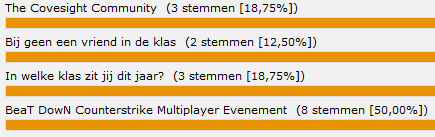
BeaT DowN Counterstrike Multiplayer Evenement
Tot nu toe heeft elk topic in The Families veel reacties opgeleverd en de verwachting is dat het hier ook zo zal zijn.
Recommended Comments