




OWN #199 - Topic van de Week

Artikel geplaatst door OWN
· 427 bezichtigingen
Wat wordt het nieuwe topic van de week? 11 leden hebben gestemd
-
1. Wat wordt het nieuwe topic van de week?
-
Unlimited Edition Gang gangtalk36%4
-
Red Dead Redemption the Liars and Cheats Pack vanaf nu beschikbaar!36%4
-
Mac beter voor designen?9%1
-
Voorwielaandrijving18%2
-
Log in of registreer om te stemmen in deze peiling.

Welk topic mag volgens jou benoemd worden tot Topic van de Week? Hieronder vind je de beschrijvingen van de topics van deze week, gevolgd door de winnaar van vorige week. Ook deze week waren er weer interessante topics en op één kan je hierboven in de poll stemmen.

Topic 1: Unlimited Edition Gang gangtalk
Het gangtalk topic van de nieuwste gang.
Topic 2: Red Dead Redemption the Liars and Cheats Pack vanaf nu beschikbaar!
Vanaf deze week is een nieuw DLC te downloaden voor Red Dead Redemption.
Topic 3" Mac beter voor designen?
De Mac wordt vaak geprezen boven Windows-pc's als het om designen gaat, maar is dit ook terecht?
Topic 4: Voorwielaandrijving
Welke auto's rijden nu fijner in GTA:IV? Die met voorwiel- of met achterwielaandrijving?
• • • • •
Topic van vorige week:
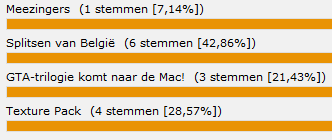
Splitsen van België
Een splitsing van België lijkt steeds realistischer, maar is het nu goed of niet?
Recommended Comments