



Skip to content
View in the app

A better way to browse. Learn more.

GTAGames.nl - De Nederlandse Grand Theft Auto Community!

A full-screen app on your home screen with push notifications, badges and more.

To install this app on iOS and iPadOS
  1. Tap the Share icon in Safari
  2. Scroll the menu and tap Add to Home Screen.
  3. Tap Add in the top-right corner.
To install this app on Android
  1. Tap the 3-dot menu (⋮) in the top-right corner of the browser.
  2. Tap Add to Home screen or Install app.
  3. Confirm by tapping Install.

Editie 36 - Peil Mee!

(0 reviews)

Hoeveel procent heb je GTA Vice City uitgespeelt? 91 members have voted

  1. 1. Hoeveel procent heb je GTA Vice City uitgespeelt?

    • 10%
      6%
      5
    • 20%
      7%
      6
    • 30%
      1%
      1
    • 40%
      2%
      2
    • 50%
      13%
      11
    • 60%
      7%
      6
    • 70%
      4%
      4
    • 80%
      8%
      7
    • 90%
      48%
      40
    • 100%
      0%
      0

This poll is closed to new votes

Please sign in or register to vote in this poll.

oc_own_peilmee.jpg

.. Deze rubriek is geschreven door Froodooo ..

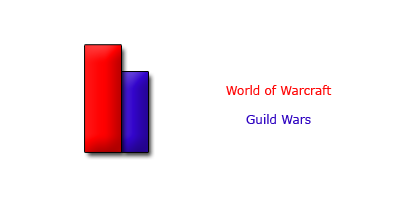
Wat is jouw favo MMORPG? Je kon hier kiezen uit een aantal online games, waarvan er twee stellingen waren. Zoals meestal neem ik deze stellingen dan bij elkaar. Daardoor zien we dat Runescape nog stemloos is, net als GW II en Silkroad Online. Drie stemmen daarna zijn gepakt door Guild Wars, maar de beste op dit moment is toch World of Warcraft met vier stemmen. De poll is nog aardig jong, dus mensen, nog even stemmen op de leukste en beste MMORPG!
blogentry-12476-1176621048.png

Topic: Favo MMORPG

Starter: maurice2

Vraag: Wat is jouw favo en de beste MMORPG?

Antwoord: World of Warcraft!

0 Comments

Recommended Comments

There are no comments to display.

Guest
Add a comment...

Account

Navigation

Search

Search

Configure browser push notifications

Chrome (Android)
  1. Tap the lock icon next to the address bar.
  2. Tap Permissions → Notifications.
  3. Adjust your preference.
Chrome (Desktop)
  1. Click the padlock icon in the address bar.
  2. Select Site settings.
  3. Find Notifications and adjust your preference.