



Jump to content
View in the app

A better way to browse. Learn more.

GTAGames.nl - De Nederlandse Grand Theft Auto Community!

A full-screen app on your home screen with push notifications, badges and more.

To install this app on iOS and iPadOS
  1. Tap the Share icon in Safari
  2. Scroll the menu and tap Add to Home Screen.
  3. Tap Add in the top-right corner.
To install this app on Android
  1. Tap the 3-dot menu (⋮) in the top-right corner of the browser.
  2. Tap Add to Home screen or Install app.
  3. Confirm by tapping Install.

1 Screenshot

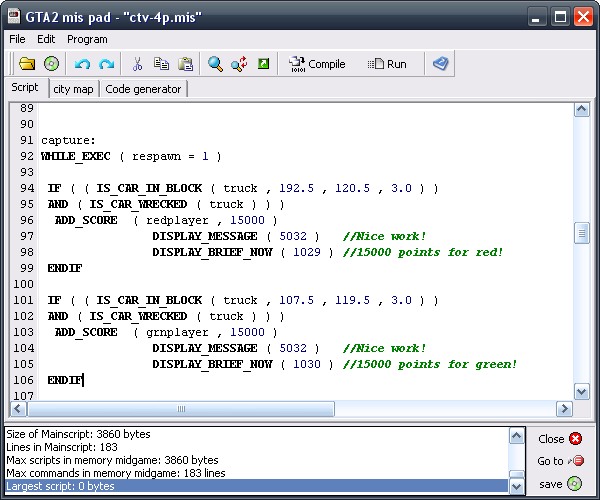
MIS Pad is een script editor voor GTA2 waarmee het een stuk eenvoudiger is om scripts te schrijven dan met Kladblok of een soortgelijk programma. Let op: ook met MIS Pad is het niet mogelijk om reeds gecompileerde scripts te bewerken.

Features:

  • Script editor die commando's, waardes en notities herkent en een duidelijke opmaak geeft
  • Dropdownbox waarmee je commando's kunt toevoegen
  • Ingebouwde compiler
  • Zoek- en vervangfunctie
  • Functie waarmee je het script direct in GTA2 kunt testen, eventueel met debug features zoals coördinaten of onschendbaarheid.
  • Functie om GMP-bestanden (maps) te laden en zo een plattegrond met zones en lichten te genereren.
  • Code generator om willekeurige wapen/power-ups te genereren.
  • De uitleg van GTA2 Scripting.doc in een overzichtelijk menu.

Configure browser push notifications

Chrome (Android)
  1. Tap the lock icon next to the address bar.
  2. Tap Permissions → Notifications.
  3. Adjust your preference.
Chrome (Desktop)
  1. Click the padlock icon in the address bar.
  2. Select Site settings.
  3. Find Notifications and adjust your preference.