



Skip to content
View in the app

A better way to browse. Learn more.

GTAGames.nl - De Nederlandse Grand Theft Auto Community!

A full-screen app on your home screen with push notifications, badges and more.

To install this app on iOS and iPadOS
  1. Tap the Share icon in Safari
  2. Scroll the menu and tap Add to Home Screen.
  3. Tap Add in the top-right corner.
To install this app on Android
  1. Tap the 3-dot menu (⋮) in the top-right corner of the browser.
  2. Tap Add to Home screen or Install app.
  3. Confirm by tapping Install.

FBI Washington

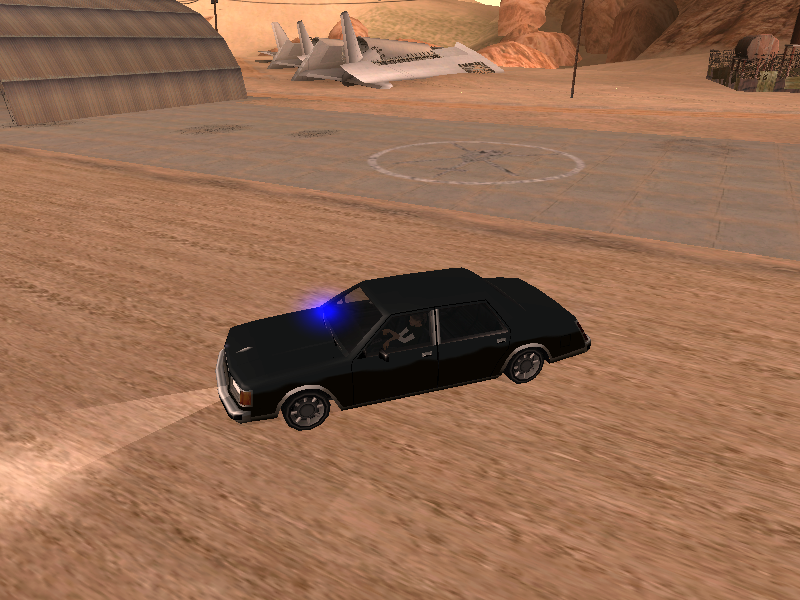
1 Screenshot

In plaats van een FBI Rancher, krijg je nu een FBI Washington achter je aan. ^_^ Net als in de goede oude tijd.

Werkt zowel in single player, als in multiplayer, als je alleen de DFF en TXD vervangt.

Andere data aanpassen is op eigen risico. Maar houd er rekening mee dat waneer je de handling.cfg aanpast, je geen MTA en SA-MP meer kunt spelen!

[hr=3]orange[/hr]

Op de screenshot maak ik tevens gebruik van de SA Police Lights mod (niet door mij) die gebruik maakt van CLEO3.

Hier kan je een filmpje bekijken met het effect van de mod, en hier kan je 'm downloaden.

Veel plezier!

Account

Navigation

Search

Search

Configure browser push notifications

Chrome (Android)
  1. Tap the lock icon next to the address bar.
  2. Tap Permissions → Notifications.
  3. Adjust your preference.
Chrome (Desktop)
  1. Click the padlock icon in the address bar.
  2. Select Site settings.
  3. Find Notifications and adjust your preference.