Skip to content
View in the app

A better way to browse. Learn more.

GTAGames.nl - De Nederlandse Grand Theft Auto Community!

A full-screen app on your home screen with push notifications, badges and more.

To install this app on iOS and iPadOS
  1. Tap the Share icon in Safari
  2. Scroll the menu and tap Add to Home Screen.
  3. Tap Add in the top-right corner.
To install this app on Android
  1. Tap the 3-dot menu (⋮) in the top-right corner of the browser.
  2. Tap Add to Home screen or Install app.
  3. Confirm by tapping Install.

Maak kans op Arthur Morgans jas

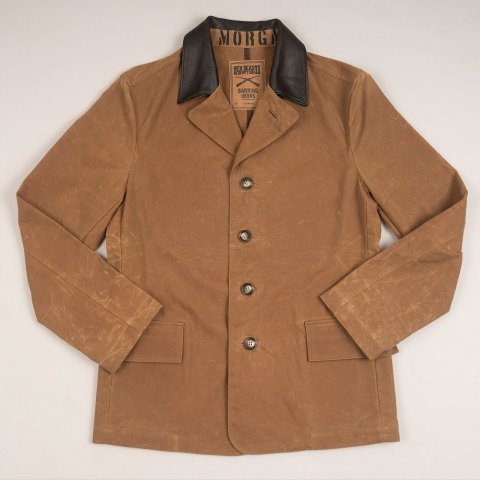
medium.5c48d25c107e1_ArthurMorgansjas.jp


Goed nieuws voor de cosplayers onder ons! Rockstar Games geeft namelijk tien jassen weg die gebaseerd zijn op de jas van onze favoriete outlaw Arthur Morgan. Deze jas is gemaakt in samenwerking met Barking Irons, en "A. Morgan" staat geprint in de nek van de jas.

Wie kans wil maken op deze jas kan meedoen op de Social Club pagina: hier klikken. De mensen die Twitter hebben kunnen hun kansen vergroten door de volgende tweet van Rockstar Games te retweeten:

https://twitter.com/RockstarGames/status/1088144880730296322

De actie op Social Club loopt tot zondag 27 januari en de twitteractie loop tot vrijdag 05:59 uur. Doe mee, want niet geschoten is altijd mis, en misschien loop jij binnenkort met deze jas rond als een echte outlaw zoals Arthur Morgan. 8)


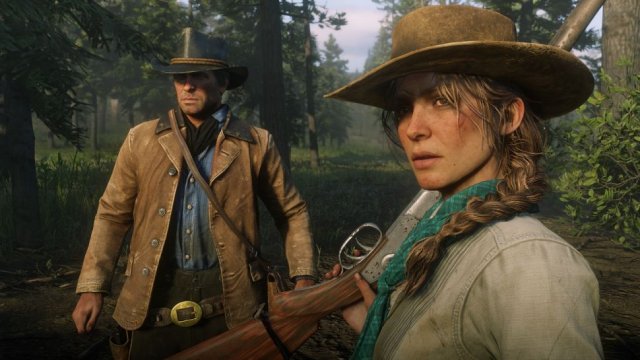
medium.RDR2Previewsept10.jpg.f9ba90b4591

De jas van Arthur Morgan waarop de echte jas gebaseerd is.


Bron: Rockstar Newswire

User Feedback

Recommended Comments

Nyltje Al Capone

Nyltje

Leden

Mijn gegevens hebben ze!

.Sharingan Legendary Godfather

.Sharingan

Leden

ooooooow snap. :D Ik doe mee!

Join the conversation

You can post now and register later. If you have an account, sign in now to post with your account.

Guest
Add a comment...

Account

Navigation

Search

Search

Configure browser push notifications

Chrome (Android)
  1. Tap the lock icon next to the address bar.
  2. Tap Permissions → Notifications.
  3. Adjust your preference.
Chrome (Desktop)
  1. Click the padlock icon in the address bar.
  2. Select Site settings.
  3. Find Notifications and adjust your preference.