




Skip to content
View in the app

A better way to browse. Learn more.

GTAGames.nl - De Nederlandse Grand Theft Auto Community!

A full-screen app on your home screen with push notifications, badges and more.

To install this app on iOS and iPadOS
  1. Tap the Share icon in Safari
  2. Scroll the menu and tap Add to Home Screen.
  3. Tap Add in the top-right corner.
To install this app on Android
  1. Tap the 3-dot menu (⋮) in the top-right corner of the browser.
  2. Tap Add to Home screen or Install app.
  3. Confirm by tapping Install.

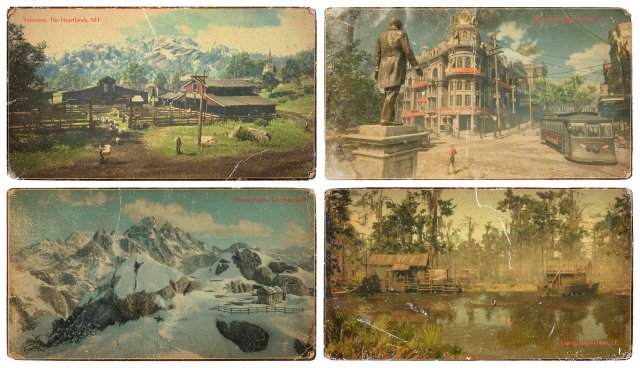
Red Dead Redemption II: Frontier, Cities and Towns

medium.rdr2_frontiercitiestowns2.jpg.dda


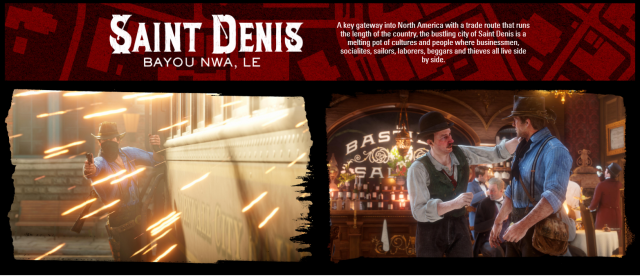
Rockstar Games heeft zojuist wat nieuwe informatie toegevoegd op de website van Red Dead Redemption II. Ditmaal komen we meer te weten over de locaties en gebieden in het spel. De informatie is hier te lezen en bevat ook veel nieuwe screenshots. 
 

medium.rdr2_frontiercitiestowns.png.cbc7

Bron: Rockstar Newswire


User Feedback

Recommended Comments

Phoenyxar Community Legend

Phoenyxar

Ereleden

Dit is veel meer mijn ding! Zij het niet dat ik per ongeluk op enter had geramd bij de agegate en de pagina nu weigert terug te gaan... yay.

PrioX Forum Legend

Saint Denis ziet er toch wel gaaf uit hoor. Hopelijk zijn er veel gebouwen waar je zo naar binnen kunt wandelen. :klap:

Phoenyxar Community Legend

Phoenyxar

Ereleden

Dat is inderdaad iets dat ik erg waardeer en ook noodzakelijk acht in open world games. Dus laten we hopen!

Join the conversation

You can post now and register later. If you have an account, sign in now to post with your account.

Guest
Add a comment...

Account

Navigation

Search

Search

Configure browser push notifications

Chrome (Android)
  1. Tap the lock icon next to the address bar.
  2. Tap Permissions → Notifications.
  3. Adjust your preference.
Chrome (Desktop)
  1. Click the padlock icon in the address bar.
  2. Select Site settings.
  3. Find Notifications and adjust your preference.