Skip to content
View in the app

A better way to browse. Learn more.

GTAGames.nl - De Nederlandse Grand Theft Auto Community!

A full-screen app on your home screen with push notifications, badges and more.

To install this app on iOS and iPadOS
  1. Tap the Share icon in Safari
  2. Scroll the menu and tap Add to Home Screen.
  3. Tap Add in the top-right corner.
To install this app on Android
  1. Tap the 3-dot menu (⋮) in the top-right corner of the browser.
  2. Tap Add to Home screen or Install app.
  3. Confirm by tapping Install.

Editie 125 - Admins Strippen

(0 reviews)

gallery_33831_25_26643.png

Deze rubriek is geschreven door Lantyz en PatrickW!

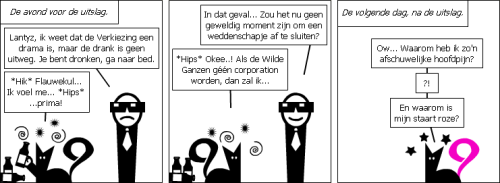
Iedere week geven Lantyz en PatrickW hun verknipte blik op het forum en alles daaromheen weer met een korte strip in OWN. Deze strips worden gemaakt met behulp van de site Stripgenerator.com. Deze week helpt Patrick Lantyz van zijn drankprobleem af.

66. Wat vooraf ging
gallery_536_26_23296.png

9 Comments

Recommended Comments

MegaPilot Community Legend

MegaPilot

Leden

:D
NickyHendriks Legendary Godfather

NickyHendriks

Leden

Daarom dus die roze staart in zijn avatar :7

End Of The Riot Legendary Godfather

End Of The Riot

Leden

Ik snap hem eigenlijk niet.... :$

Tjerk Postless Person

Tjerk

Banned

Bwehehehe

Hanneswasco Forum Legend

Hanneswasco

Ereleden

Ik snap hem eigenlijk niet.... :$

En dat noemt zich dan een Belg. :duh:

thomas1010 Bank Overvaller

thomas1010

Leden

Ik snap hem eigenlijk niet.... :$

Kijk hij had gewed met PW dat als de wilde ganzen geen corp worden dat hij een roze staart gaat dragen

GTA Haas Al Capone

GTA Haas

Leden

Ik snap hem eigenlijk niet.... :$

Lantyz was z

TomHagen The Godfather

TomHagen

Leden

Mensen die het niet snappen moeten het nog maar een keer lezen. :7

Donald F. Duck Kingpin

Donald F. Duck

Leden

:schater:
Guest
Add a comment...

Account

Navigation

Search

Search

Configure browser push notifications

Chrome (Android)
  1. Tap the lock icon next to the address bar.
  2. Tap Permissions → Notifications.
  3. Adjust your preference.
Chrome (Desktop)
  1. Click the padlock icon in the address bar.
  2. Select Site settings.
  3. Find Notifications and adjust your preference.