




Trainers
Geen zin om cheats in te voeren maar wel lekker vals te spelen? Download dan een trainer
1 bestand
-
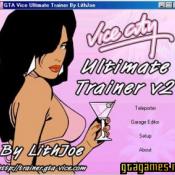
Een zeer goede trainer van Lithjoe met vele opties!
De trainer bevat onder andere:
Alle cheats van de game zelf
Oneindige health/armor/ammo
Stop de tijdklok van missies
Spawm de beste auto's naast je voeten (Hunter en andere)
Jetpackfunctie waarmee je oneindig hoog en dwars door gebouwen kunt gaan
Draai auto weer op wielen / deuren op slot / gepantserde auto / repareer auto
Teleporter
Verander skin in andere modellen uit Vice City, o.a. Candy Suxxx
In-game screenshots maken
Deze trainer werkt enkel goed met de originele versie van GTA Vice City. Mogelijk geeft deze trainer problemen met de Steam versie van het spel!
- 4642 Downloads
 Door LantyzBijgewerkt
Downloadstatistieken
- 773 Bestanden
- 2414 Reviews
-
Recent actief 0
- Er zijn hier geen geregistreerde gebruikers aanwezig.