



Skip to content
View in the app

A better way to browse. Learn more.

GTAGames.nl - De Nederlandse Grand Theft Auto Community!

A full-screen app on your home screen with push notifications, badges and more.

To install this app on iOS and iPadOS
  1. Tap the Share icon in Safari
  2. Scroll the menu and tap Add to Home Screen.
  3. Tap Add in the top-right corner.
To install this app on Android
  1. Tap the 3-dot menu (⋮) in the top-right corner of the browser.
  2. Tap Add to Home screen or Install app.
  3. Confirm by tapping Install.

GTA2 PowerManager

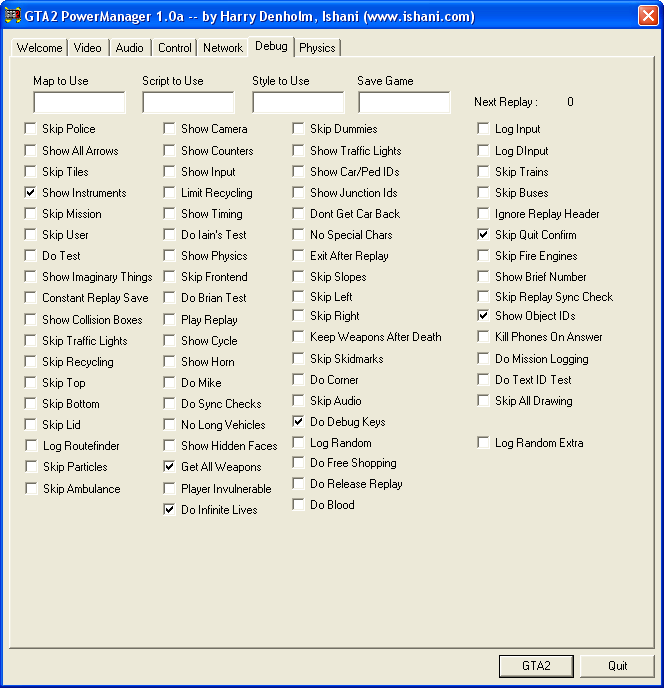
1 Screenshot

Harry Denholms PowerManager is een tweede Manager met twee extra tabbladen.

In Debug vind je 70 nieuwe opties die je kan inschakelen alvorens het spel te starten, variërend van bekende cheats als 'Get all weapons' tot en met modfuncties al 'Show IDs'.

Het tabblad Physics geeft je de mogelijkheid om de eigenschappen van de voertuigen aan te passen door middel van eenvoudige schuifbalken (zie WikiGTA voor een tutorial.

De PowerManager vervangt de originele Manager niet, dus je kunt GTA2 nog steeds via de normale Manager spelen. Om de PowerManager te gebruiken plaats je GTA2_powermgr.exe simpelweg in dezelfde map waar GTA2.exe staat. Een uitgebreide (Engelse) uitleg vind je in de ReadMe.

Account

Navigation

Search

Search

Configure browser push notifications

Chrome (Android)
  1. Tap the lock icon next to the address bar.
  2. Tap Permissions → Notifications.
  3. Adjust your preference.
Chrome (Desktop)
  1. Click the padlock icon in the address bar.
  2. Select Site settings.
  3. Find Notifications and adjust your preference.