Skip to content
Bekijk in de app

Een betere weg om onze GTA community te volgen. Leer meer.

GTAGames.nl - De Nederlandse Grand Theft Auto Community!

Een volledig scherm app op het beginscherm inclusief notificaties, badges en meer.

Om deze app op je iPhone en iPad te installeren
  1. Druk op het icoon in Safari
  2. Scroll in het menu en druk op Zet op beginscherm.
  3. Druk op Voeg toe rechts bovenaan.
Om deze app op je Android toe te voegen
  1. Druk op het 3-punten menu (⋮) rechts bovenaan in de browser.
  2. Druk op Toevoegen aan beginscherm of Installeer app.
  3. Druk op Toevoegen om te bevestigen.
Geplaatst:

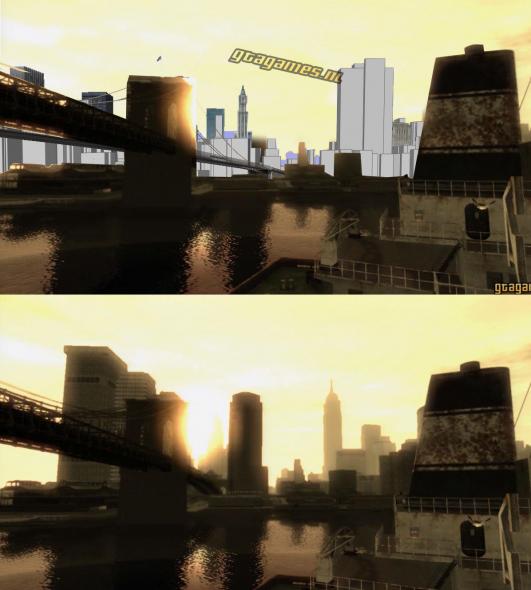
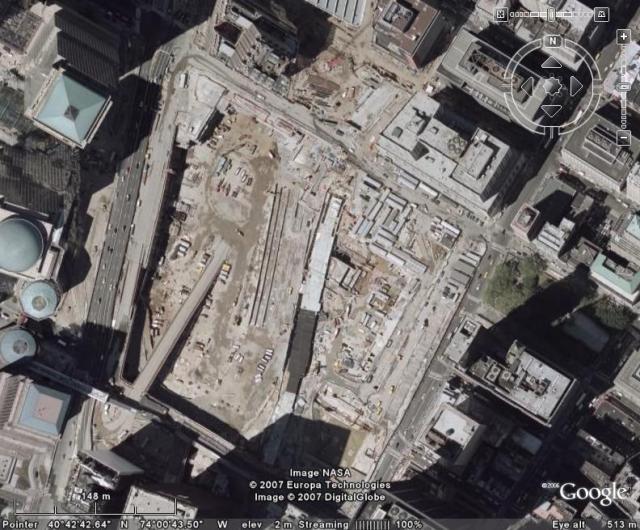
While, it's difficult to tell from the released screenshots, the Twin Towers of the World Trade Center are absent (the game is set in the 'now') and Rockstar has stated that 9/11, or a fictional version of it, will feature in the story line of the game at some level. We were told that, wisely, the story would more likely deal with the way that people have sought to capitalise on the tragedy rather than address it directly. Which leads us on to planes, or lack of them

Bron:Gamesradar

  • Reacties 47
  • Bezichtigingen 3.1k
  • Aangemaakt
  • Laatste reactie

Populairste bijdragers

Populaire afbeeldingen

Featured Replies

Geplaatst:

nog een bewijs dat gta IV geen kopie is van new york in de trailer kijk je vannuit een park naar de manathan bridge terwijl er helemaal geen park naast ligt heb ik ondekt in google earth hoeveel fans zweeven er wel niet boven new york met google earth.

  • 1 year later...
Geplaatst:
:bier: sorry voor de bump maar waar is ground zero en dat kleine rolletje in het verhaal vande wtc?

Een reactie plaatsen

Je kan nu een reactie plaatsen en pas achteraf registreren. Als je al lid bent, log eerst in om met je eigen account een reactie te plaatsen.

Gast
Op dit onderwerp reageren...

Recent actief 0

  • Er zijn hier geen geregistreerde gebruikers aanwezig.

Account

Navigatie

Zoeken

Zoeken

Configureer push berichten

Chrome (Android)
  1. Tap the lock icon next to the address bar.
  2. Tap Permissions → Notifications.
  3. Adjust your preference.
Chrome (Desktop)
  1. Click the padlock icon in the address bar.
  2. Select Site settings.
  3. Find Notifications and adjust your preference.