Jump to content
View in the app

A better way to browse. Learn more.

GTAGames.nl - De Nederlandse Grand Theft Auto Community!

A full-screen app on your home screen with push notifications, badges and more.

To install this app on iOS and iPadOS
  1. Tap the Share icon in Safari
  2. Scroll the menu and tap Add to Home Screen.
  3. Tap Add in the top-right corner.
To install this app on Android
  1. Tap the 3-dot menu (⋮) in the top-right corner of the browser.
  2. Tap Add to Home screen or Install app.
  3. Confirm by tapping Install.

Editie 107 - Admins Strippen

(0 reviews)

gallery_33831_25_26643.png

Deze rubriek is geschreven door Lantyz en PatrickW!

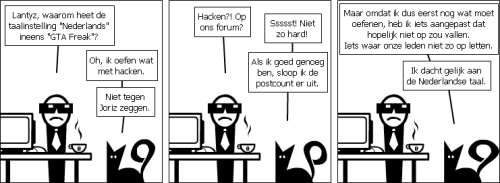
Iedere week geven Lantyz en PatrickW hun verknipte blik op het forum en alles daaromheen weer met een korte strip in OWN. Deze strips worden gemaakt met behulp van de site Stripgenerator.com. Deze week werd duidelijk dat het voorval begin deze week een zeer duistere achtergrond had.

48. Oefenen
gallery_536_26_10491.png

9 Comments

Recommended Comments

Jowx The Godfather

Jowx

Ereleden

Meesterlijk.. _O_

MegaPilot Community Legend

MegaPilot

Leden

Waar halen jullie het vandaan? :puh:

Heftig. :puh:

NickyHendriks Legendary Godfather

NickyHendriks

Leden

Dat hacken komt van mijn topic of niet?

Maar verder een super strip

Ymosky Ballas leider

Ymosky

Leden

Hahaha, geweldige strip weer! :tu:

succes met oefenen Lantyz :D

End Of The Riot Legendary Godfather

End Of The Riot

Leden

HAHAHAHAHAHA :schater:

Deze is echt geniaal. :7

Arjen Legendary Godfather

Arjen

Leden

Het komt steeds vaker boven water drijven over het verwijderen van de postcount. :D

Geniaal!

Sprunk Legendary Godfather

Sprunk

Leden

Ik lig bubbel hier :schater:

Overigens probeer ik altijd zo goed mogelijk te schrijven. Dat is voor mij moeilijk want ik heb een lichte vorm van Dyslexie.

BTW, Kan ik uit deze strip concluderen dat de post-count ook ooit eens word afgeschaft? :clown:

Visser23 The Godfather

Visser23

Leden

Als die eekhoorn Lantyz goed genoeg in hacken is misschien wel ja :Y

Guest
Add a comment...

Account

Navigation

Search

Configure browser push notifications

Chrome (Android)
  1. Tap the lock icon next to the address bar.
  2. Tap Permissions → Notifications.
  3. Adjust your preference.
Chrome (Desktop)
  1. Click the padlock icon in the address bar.
  2. Select Site settings.
  3. Find Notifications and adjust your preference.